
Python 연습장
progress bar - tqdm 사용법 본문
728x90
tqdm 사용법은 간단하다.
for 문 끝에 iterator 나 list 등에 tqdm 만 씌워주면 알아서 프로그래스 바가 생성된다.
time.sleep 을 써준 이유는 프로그레스 바가 진행되는 모습을 보여주려고 추가한 거고 실제 사용시에는 없앤다.
from tqdm import tqdm
import time

for i in tqdm(range(10000)):
    time.sleep(0.01)

위 구문은 아래처럼도 사용할 수 있다.
from tqdm import trange
for i in trange(10000):
    time.sleep(0.01)
enumerate 사용시에는 tqdm(enumerate ~ 가 아니라 enumerate(tqdm ~ 순서여야 프로그레스 바가 나타난다.
from tqdm import tqdm
list_temp = ['a','b','c']
for i, var in enumerate(tqdm(list_temp)):
    time.sleep(0.1)
매뉴얼로 업데이트하는 방법
with tqdm(total=100) as pbar:
    for i in range(10):
        sleep(0.1)
        pbar.update(10)
with 문을 사용하거나 아래처럼 pbar 라는 변수에 tqdm 을 선언하고 for 문을 돌려도 된다. 이 때 pbar.close() 는 꼭 해줘야 한다고 깃헙가이드 문서(https://github.com/tqdm/tqdm)에 나와있다.
pbar = tqdm(total=100)
for i in range(10):
    sleep(0.1)
    pbar.update(10)
pbar.close()
그 밖에 옵션
from tqdm import tqdm
iterable = ['a','b','c']
for i in tqdm(iterable, # 반복가능한 iterable 객체
              desc = 'Description', # 프로그레스 바 맨 앞에 나타날 문구
              total = 4, # len(iterable)이 Default. 굳이 바꿀 일은 없을 듯.
              ncols = 70, # 프로그레스 바 너비, desc 의 글자개수가 포함되므로 적절히 설정
              ascii = True, # default는 False, True 시 바 모양이 '#' 로 나타남. 다른 character 로 변경 시 첫 번째 문자는 공백이어야 작동. ex. ascii = ' ='
              colour = 'blue', # '#0000ff' 헥스코드로도 입력 가능
              initial = 1, # 초기값. default = 0,
              position = 0 # 바 위치 설정. 여러개의 바 관리할 때 지정
              ):
    time.sleep(0.1)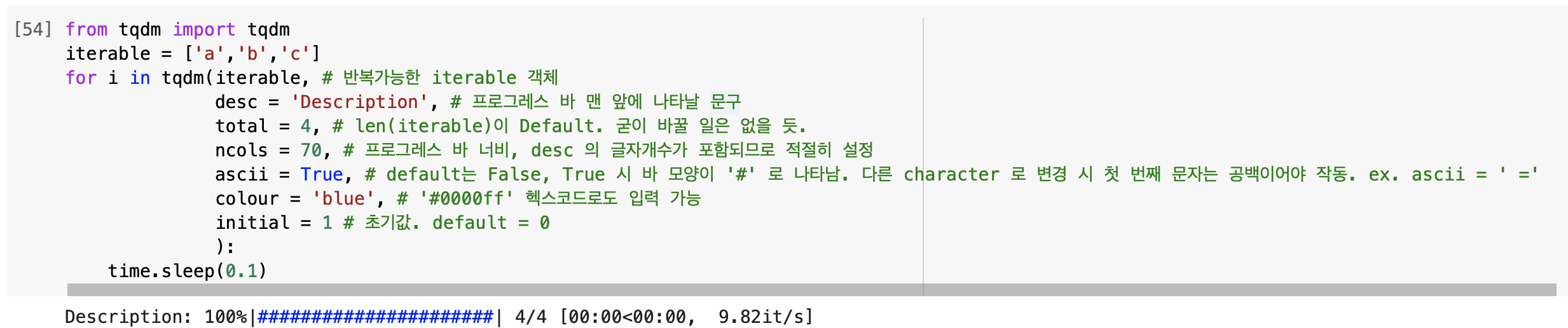
진행 중인 단계 알려주기 : set_description
from tqdm import tqdm
iterable = ['a','b','c']
pbar = tqdm(iterable, ascii = False, colour = 'blue')
for char in pbar:
    time.sleep(0.1)
    pbar.set_description("Processing '%s'" % char)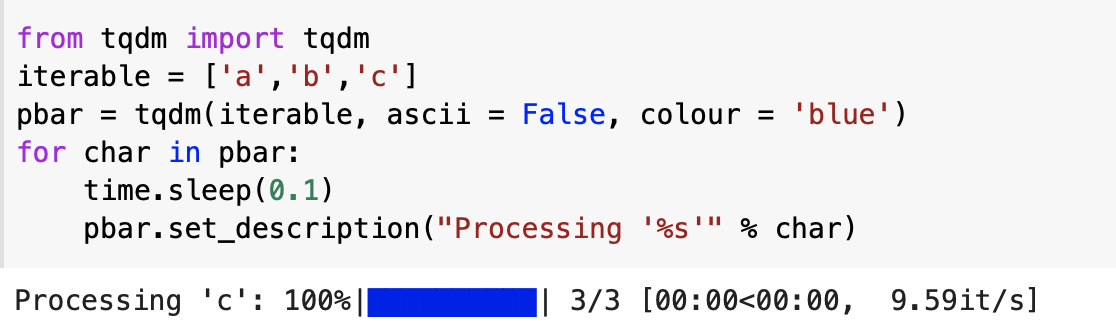
728x90
'코딩' 카테고리의 다른 글
| colab 에서 google drive mount 하기 (0) | 2023.01.02 |
|---|---|
| torch 설치 (0) | 2022.12.29 |
| 구글 코랩(colab)을 알아보자 (0) | 2022.09.07 |
| Python 가상환경 만들기 (0) | 2022.08.09 |
| Global memery usage 확인 방법 in Python (0) | 2022.08.09 |
'코딩' Related Articles
more


Comments